Editing and Managing Postings
Edit posting details, manage candidates, and understand the posting detail page.
Editing a Posting
Click a posting from your dashboard to open the detail page
Click Edit in the posting header
Make your changes — all the same fields from creation are available
Click Save Changes
Changes apply to future candidates only. Candidates who have already started or completed their interview are not affected.
Concurrent Editing Protection

Talent Systems prevents two people from editing the same posting at the same time:
| Scenario | What Happens |
|---|---|
| Someone else is editing | You see a banner with the editor's name. The page is read-only until they finish. |
| Editor closes the tab | The lock releases automatically. |
| Editor is idle for 2 minutes | The lock releases automatically. |
| Two saves happen simultaneously | The system detects the conflict and asks you to reload. |
This protection applies to all editable resources: postings, sessions, permissions, and competencies.
Interview Script Overrides (Per Posting)
If your team's global interview script doesn't quite fit a particular role, you can customize it for one posting without affecting any other posting or your team's defaults. The override section lives at the bottom of the posting edit form.
| Field | What it controls |
|---|---|
| Opening Script | The first thing the AI says when the candidate joins the interview. 10–2000 characters. |
| Closing Script | What the AI says to wrap up before the interview ends. 10–2000 characters. |
| Maximum Follow-up Probes | Cap on follow-up questions the AI may ask (per question on Semi-Structured, per competency on Adaptive). 0–10. Hidden on Structured by design — Structured doesn't allow probes. |
Each field shows the current team default in a panel above the input. Leave a field blank to keep using the team default. Type into it to override only that field for this posting; the others continue to inherit.
Empty fields always track your team's live defaults — if a science admin updates the global opening script later, this posting picks up the change for any field you didn't override. Only the fields you explicitly customized stay frozen.
If you turn the toggle on but leave every field blank, you'll see an amber warning. Turn the toggle off if you don't want to customize, or fill in at least one field.
Deleting a Posting
Click Delete on the posting detail page
Confirm in the modal
Deletion is permanent from your dashboard view, but all candidate data (transcripts, scorecards, integrity flags) is retained for legal compliance. It does not disappear from the system.
The Posting Detail Page
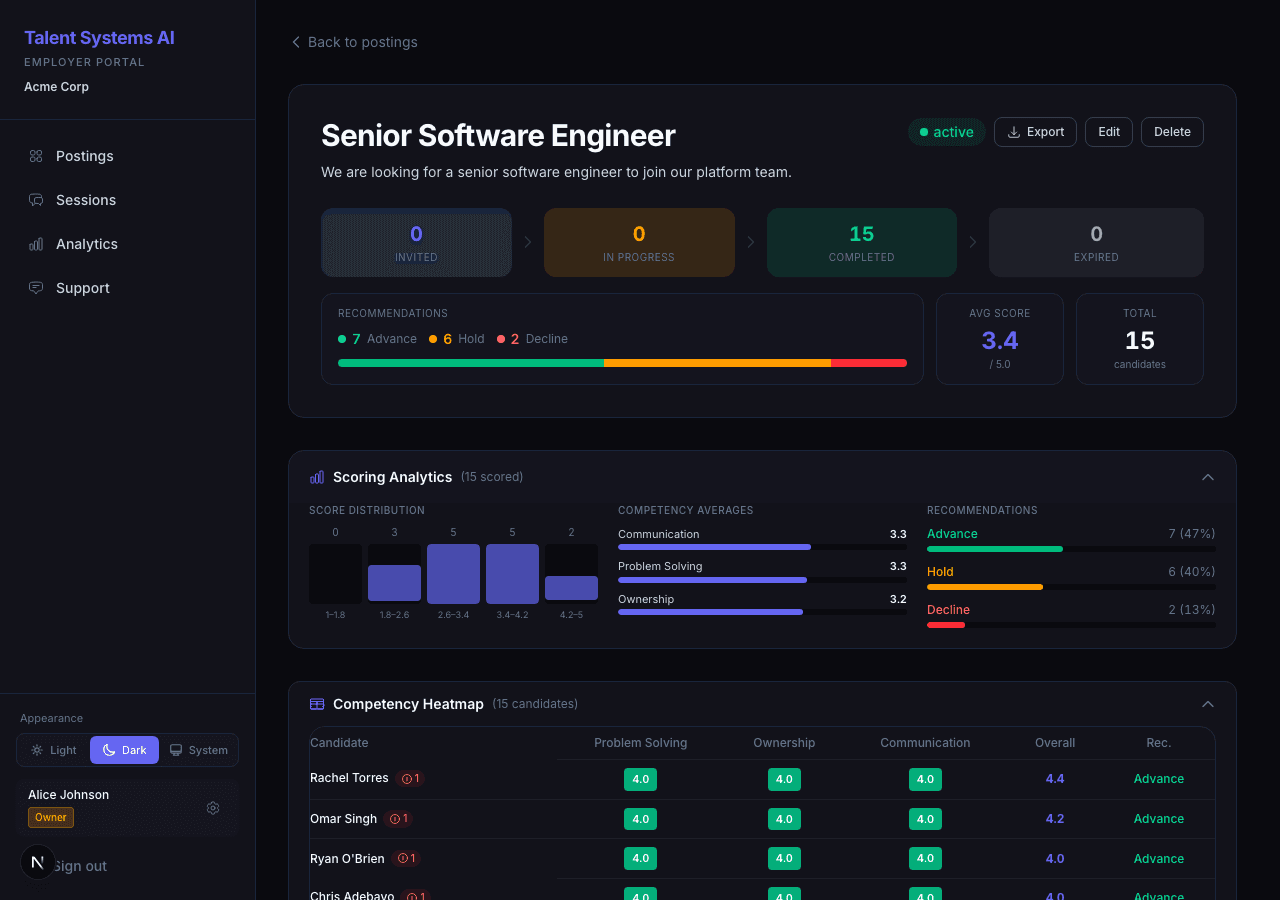
The posting detail page is your command center for a specific role:
| Section | What It Shows |
|---|---|
| Pipeline Funnel | Visual breakdown of candidates by interview stage |
| Recommendation Breakdown | Advance / Hold / Decline percentages |
| Candidate List | All candidates with status badges, scores, and action buttons |
| Scoring Analytics | Score distribution, competency averages, recommendation charts |
| Competency Heatmap | Color-coded grid of all candidates across all competencies |
Candidate List Features
- Search, filter, and sort via the filter modal — filter state is saved in the URL, so it survives navigation
- Infinite scroll loads additional candidates automatically as you scroll
- Compare checkboxes appear when 2 or more candidates have scores — select up to 5 for side-by-side comparison
- Status and recommendation pills on each candidate row
- Integrity score shown as a shield badge when applicable