Managing Candidates
Track candidate status, move them through pipeline stages, and manage their interview records.
Candidate Statuses
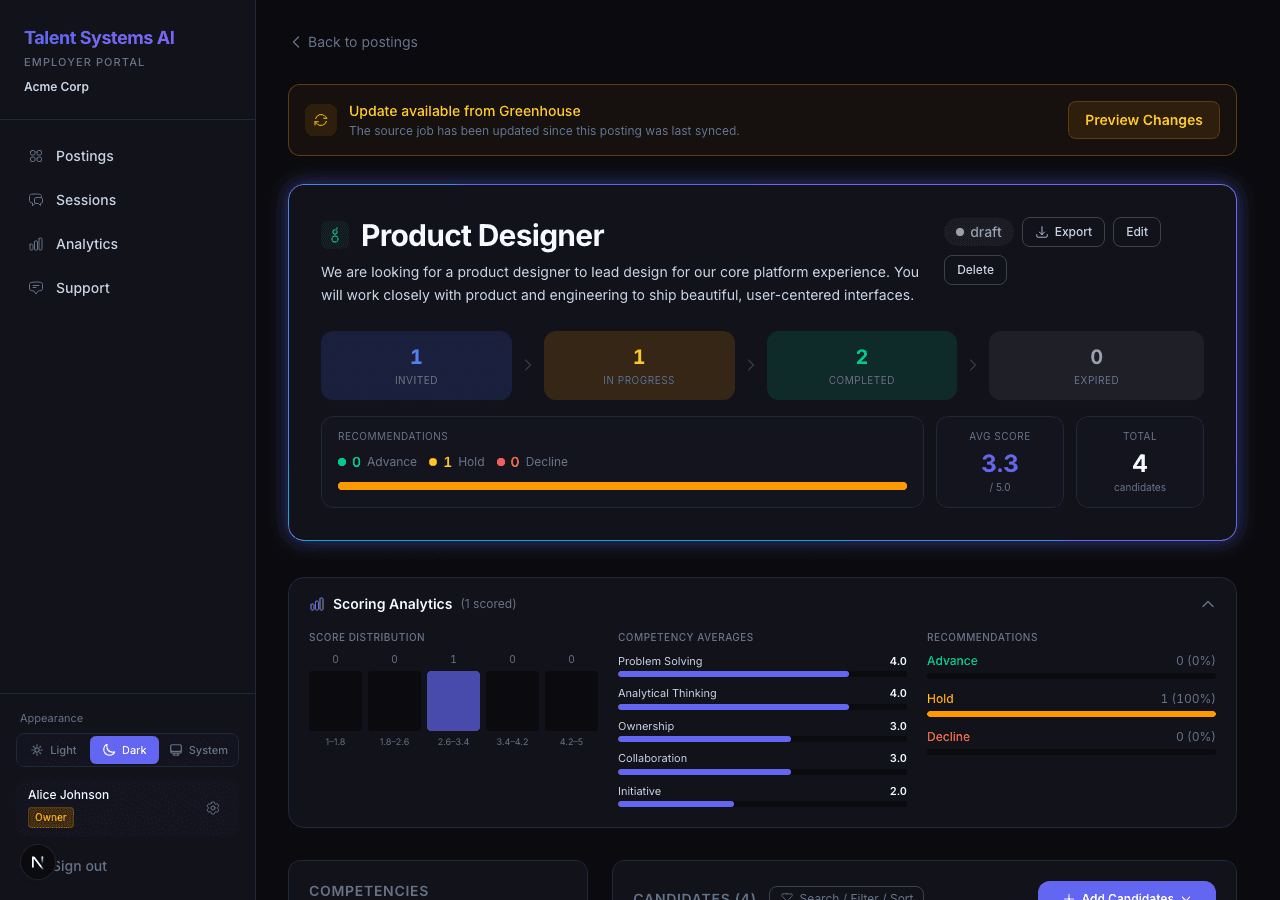
| Status | Meaning |
|---|---|
| Invited | Email sent, waiting for the candidate to start |
| In Progress | Candidate has started the interview |
| Complete | Interview finished, scorecard available |
| Expired | 7-day invitation window passed without starting |
Pipeline Stages
Pipeline stages track a candidate's progress through your hiring process. Stages are forward-only — you cannot move a candidate backward. Terminal stages (Rejected and Withdrew) cannot be changed once set.
Your organization's pipeline stages are configured in Settings > Pipeline. You start with five default stages and can customize labels, colors, and ordering, or add additional stages.
| Default Stage | Meaning |
|---|---|
| Pending Review | Default stage after submission or interview completion. Awaiting your team's evaluation. |
| Under Review | Your team is actively reviewing the scorecard and materials. |
| Hired | Candidate selected for the role. Hire date recorded automatically. |
| Rejected | Candidate not selected. No further stage changes allowed. |
| Withdrew | Candidate withdrew from the process. No further stage changes allowed. |
Change a candidate's stage from either:
- Posting detail page — stage selector next to each candidate in the list
- Candidate detail page — stage selector at the top of the profile
Stage changes may trigger automated follow-up surveys if your organization has configured intervals for specific stages. For example, moving a candidate to "Hired" may schedule a 30-day check-in. See Pipeline Stages Settings to customize your organization's stages.
Viewing a Candidate
Click any candidate row to open their profile. The row provides two visual cues on hover so you can tell it's a link: the candidate's name turns accent-coloured and underlines, and a chevron appears at the right edge. These cues disappear when you hover one of the row's inline controls — the stage selector, the compare checkbox, or the action button — so the row only looks like a link when clicking it will actually navigate. The inline controls handle their own clicks; using them never sends you to the candidate profile.
What you see on the profile depends on your role and your organization's permission settings:
Candidate status, invitation date, interview mode, pipeline stage, and best-match postings from your talent pool.
Uploaded resume text (if the candidate provided one during the interview flow).
Competency scores with evidence quotes, strengths, concerns, overall recommendation, and integrity score.
Requires scorecard access permission.
Full interview transcript with timestamps.
Requires transcript access permission.
Flagged Interviews
If the integrity monitor flagged something during a candidate's interview that needs a human look, you'll see an amber Review (n) pill on that candidate's row and a banner on their detail page. Click it to review the flagged events and mark them resolved. See Reviewing Flagged Interviews for details.
Revoking an Invitation
For candidates with status Invited who haven't started yet:
Click Revoke on the candidate row
Confirm in the modal
The interview link immediately returns a 404. Use this when you've invited the wrong person or the role has already been filled.
Resetting an Interview
For candidates with status In Progress, Complete, or Expired:
Click Reset on the candidate row
Confirm in the modal
A new invitation email is sent with a fresh link. The previous transcript, scorecard, and integrity flags are cleared.
Resetting clears all interview data for that candidate. Use it only when a candidate had genuine technical issues or your organization has approved a re-interview.
Sorting and Filtering the Candidate Grid
Each stage tab (Résumé, Interview, Practical, Completed) shows candidates in a scoring heatmap. You can reshape it without losing your place:
- Sort any column. Click a column header — Candidate, any score/competency column, or Overall — to sort by it; click again to flip the direction. New candidates default to Overall, highest first. Your choice is remembered per posting and per tab.
- Filter columns with the funnel icon on a header. Score columns filter Above or Below a number; the résumé verdict columns let you check which labels to show (then Apply). You can filter several columns at once — active filters appear as removable chips above the grid (with Clear all), and the funnel turns amber on a filtered column. Filters are remembered too.
Sorting and filtering only reshape the list — the Scoring Analytics card above the grid always reflects every scored candidate in the tab, not just what's visible.
Select multiple candidates with the checkboxes (or the select-all box in the header, which keeps selecting as you scroll) to compare them or take a bulk action. Press Esc to clear the selection.
Accommodation Requests
Candidates can request a reasonable accommodation (or, for UK-based organizations, a reasonable adjustment) directly from the interview — there's a link on the setup screen and a help icon during the interview. The wording shown to the candidate follows your organization's billing country.
When a candidate submits a request:
- It appears in an Accommodation requests card at the top of that candidate's detail page, with the date, the request text, and a status badge (New / Acknowledged / Resolved).
- Your team gets a notification (in-app, and by email if that notification type is enabled in Settings → Notifications).
Review each request and respond to the candidate through your usual channels. These requests are part of the candidate's record and are retained per your data-retention policy.