Scorecards & Analytics
Pipeline Funnel
Track candidate progress from invitation through completion at a glance.
The pipeline funnel sits at the top of every posting detail page, giving you an immediate read on where your candidate pool stands — without opening a single individual record.
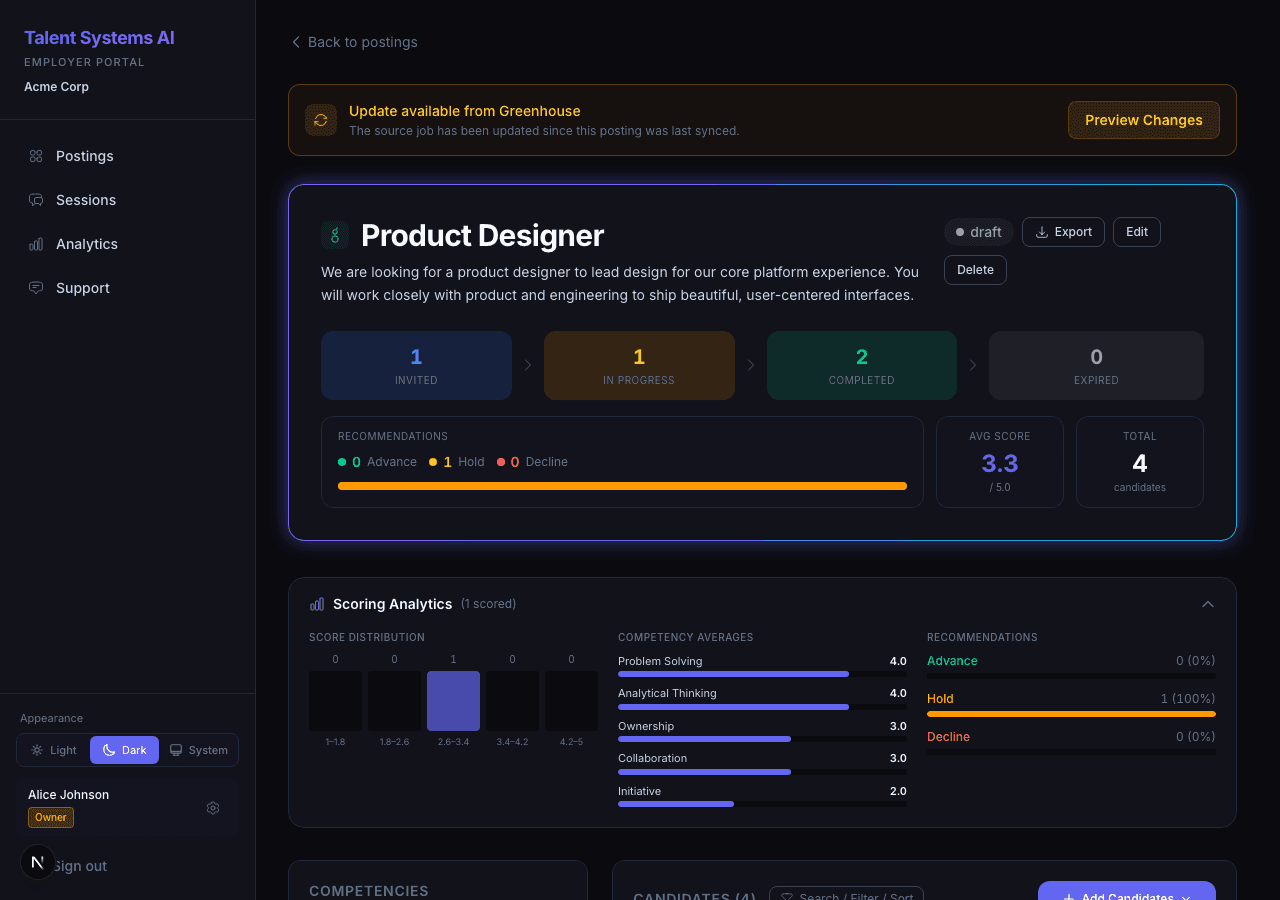
Interview Stages
| Stage | Meaning |
|---|---|
| Invited | The candidate received their link but hasn't started the interview yet |
| In Progress | The candidate is currently in their interview |
| Completed | The interview finished and a scorecard is available |
| Expired | The 7-day invitation window passed without the candidate starting |
Each segment shows a count. The colored proportions make it easy to see your completion rate at a glance.
Summary Metrics
Below the funnel, three metrics summarize your candidate pool:
| Metric | What It Tells You |
|---|---|
| Recommendation Breakdown | Percentage split between Advance, Hold, and Decline across all completed candidates |
| Average Score | Mean weighted score across all completed candidates |
| Total Candidates | Everyone invited to this posting, regardless of interview status |
All three update in real time as candidates complete their interviews.
Common Questions the Funnel Answers
Expired candidates can be re-invited from the candidate list. Their previous invitation is not recoverable, but a fresh link resets the 7-day window.