Greenhouse Integration
Connect your Greenhouse ATS to automatically send candidates for assessment and receive results back.
If your organization uses Greenhouse, you can connect it to Talent Systems so candidates are automatically sent for assessment when they reach the right pipeline stage — and results flow back to Greenhouse when they're done.
How It Works
A candidate reaches the Assessment stage in your Greenhouse pipeline
Greenhouse sends the candidate to Talent Systems automatically
The candidate receives a link to their assessment — interview, practical, or both
When the candidate completes their assessment, Greenhouse is notified
Recruiters can view scores and results directly from Greenhouse, or click through to the full scorecard in Talent Systems
What You Need
- A Greenhouse account with Assessment Partner integrations enabled
- An API key from your Talent Systems administrator
- At least one active posting in Talent Systems mapped to a Greenhouse job
Setup
1. Get Your API Key
Contact your Talent Systems administrator to generate a Greenhouse API key for your organization. The key starts with gh_ followed by a long string. Keep it secure — it authenticates all communication between Greenhouse and Talent Systems.
2. Configure Greenhouse
In your Greenhouse account, go to Configure > Dev Center > API Credentials and add a new Assessment Partner integration with these URLs:
| Field | URL |
|---|---|
| List Tests URL | https://app.talentsystems.ai/api/greenhouse/list_tests |
| Send Test URL | https://app.talentsystems.ai/api/greenhouse/send_test |
| Test Status URL | https://app.talentsystems.ai/api/greenhouse/test_status |
| Error Notification URL | https://app.talentsystems.ai/api/greenhouse/response_errors |
Enter your API key when prompted.
3. Map Jobs to Postings
When you add an Assessment stage to a Greenhouse job, you'll see a list of your active Talent Systems postings. Select the one that matches. Make sure the posting is fully configured and active (not draft) before connecting it.
4. Test the Connection
Use Greenhouse's built-in test feature to send a test candidate. Verify:
- The test candidate appears in the posting's candidate list in Talent Systems
- The candidate receives an assessment link
- After completing the assessment, the status updates in Greenhouse
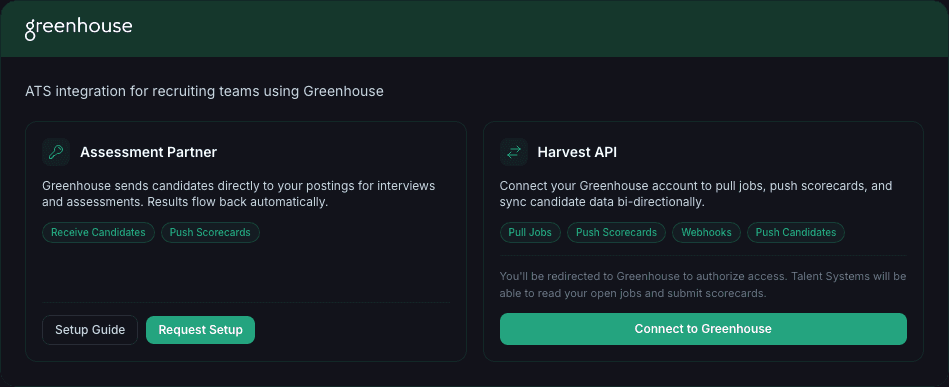
The Harvest API connection enables bidirectional sync — import Greenhouse jobs as draft postings and push assessment results back automatically.
Connecting
Go to Settings > Integrations in your Talent Systems dashboard
On the Greenhouse card, find the Harvest API section and click Connect to Greenhouse
You'll be redirected to Greenhouse to authorize access
After authorizing, you'll return to Talent Systems with a green "Connected" badge
Importing Jobs
Go to your Postings page and click Import from Greenhouse
Search and browse your open Greenhouse jobs
Click Import — this creates a draft posting pre-filled with the job title and description
Edit the draft to add competencies, questions, and assessment configuration, then publish
Jobs you've already imported show an "Imported" badge so you don't accidentally import them twice.
Disconnecting
Click Disconnect on the Harvest API card in Settings > Integrations. Existing candidates and postings are not affected — only future sync stops.
What Happens to Candidates
- Candidates sent from Greenhouse are created automatically in Talent Systems — no manual invite needed
- Greenhouse handles candidate communication, so Talent Systems does not send a separate invitation email
- Candidates appear in your posting's candidate list with all the same features: scorecard, analytics, comparison, export
- If you reset a Greenhouse-sourced candidate, the new link is generated but no email is sent — use Greenhouse to re-notify them
Viewing Results
When a candidate completes their assessment:
| Where | What You See |
|---|---|
| In Greenhouse | Status updates to "Complete" with a score and a link to the full results |
| In Talent Systems | Full scorecard, competency breakdown, recommendation, and transcript |
Troubleshooting
| Issue | Solution |
|---|---|
| Postings not showing in Greenhouse | Make sure the posting is active (not draft) and your API key is valid |
| Candidate not created | Check that the Greenhouse job is mapped to the correct posting |
| Results not appearing in Greenhouse | The assessment may still be in progress — Greenhouse polls for status automatically |
| API key not working | Contact your administrator — the key may have been revoked or rotated |
Managing API Keys
API keys are managed by Talent Systems administrators. Administrators can generate new keys, rotate existing keys (old key stops working immediately), and revoke keys if they are compromised.
If the Assessment Partner integration isn't configured yet, click Request Setup on the integration card. This notifies the Talent Systems team to set up your API key. You'll see a "Requested" badge while it's being processed.